One of the biggest reasons anyone hates working on their laptop is how uncomfortable it can be. However, there are ways to make your workspace both mobile and ergonomic.
The first time I heard of ergonomics, I thought it was some bougie, woo-woo thing. But it changed the way I work and now there are things I always do to make sure that working on my computer doesn’t end up being a literal pain in the neck.
I got a laptop stand. Your screen should be positioned at eye level and in such a way that you don’t have to bend your neck to read what’s on it. I use this stand because it’s lightweight and foldable, so I can easily work from another room or slip it into my bag and work elsewhere.
I got a separate keyboard and mouse. This isn’t surprising since your laptop is now out of reach on your fun new stand. I use a bluetooth keyboard and mouse combo because I hate having cables everywhere. You’ll even find foldable keyboards.
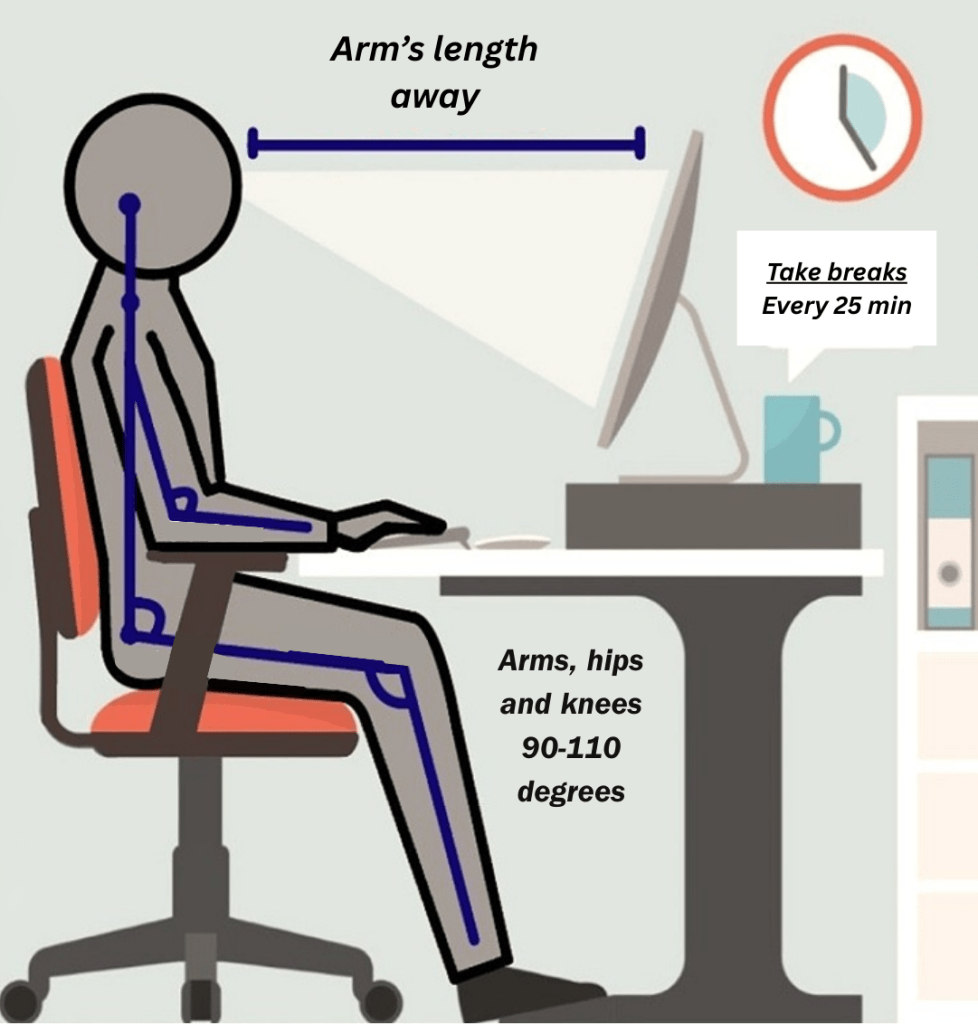
I got a footrest. This is probably just because I’m shorter than all of you, but this helps with the goal of having your elbows, knees, and hips at a 90° angle as much as possible.
At the end of the day, you’ll want to be in a position that allows you to be neutral and practically at-rest, like this guy:
Further Reading
If you’re curious to learn more about ergonomics, UVA has a whole OSHA-type department that not only talks about your workspace, but the impact that desk work can have on the body, and recommended stretches to prevent longterm injury. More here.
Until next time!
Dom
Admin Consultant
USCG 100Ton Captain
 Blog: Navigating Admin